

Sanjan Sharma · Founder & Director
Sanjan Sharma is an entrepreneur and technology and digital growth professional with 8+ years of experience across digital marketing, technology, SaaS, education, BFSI, banking, B2B sales and business growth.
LinkedIn automation tools are sold as a way to multiply your outreach, and for a few weeks they usually do. Then the acceptance rate falls, the replies turn hostile, and somebody on the team gets a warning on their account. The tool was not the problem. The assumption behind it was.
LinkedIn automation tools work when they remove typing, and fail when they try to remove judgement. Here is where that line actually sits, and the five rules we apply before we let any of them near a client’s account.
1. Read the rules you are agreeing to break
LinkedIn’s User Agreement prohibits scraping and the use of software that automates activity on the platform. That is not a technicality, and it does not have an enterprise exemption. Every vendor in this category operates against it, however carefully their marketing is worded.
So the honest framing is risk management, not compliance. Browser-based LinkedIn automation tools that act from your own session look like you to LinkedIn’s detection, while cloud tools that log in from a foreign data centre look like someone else. Consequently the first question is not which features you get, but where the tool runs.
2. Treat volume limits as hard, not as settings
Most LinkedIn automation tools let you set a daily connection figure far above anything safe, because a high number sells the licence. In practice an established account tolerates roughly twenty connection requests a day, and a new one far fewer. Moreover the limit that matters is not the one in the tool, it is the one in LinkedIn’s weekly invitation cap.
Therefore warm an account up over several weeks rather than switching it on at full rate. Start low, hold, increase slowly, and stop entirely for a few days if acceptance drops below about fifteen per cent. Similarly, never run two tools on one account, because their timing patterns overlap into something no human could produce.
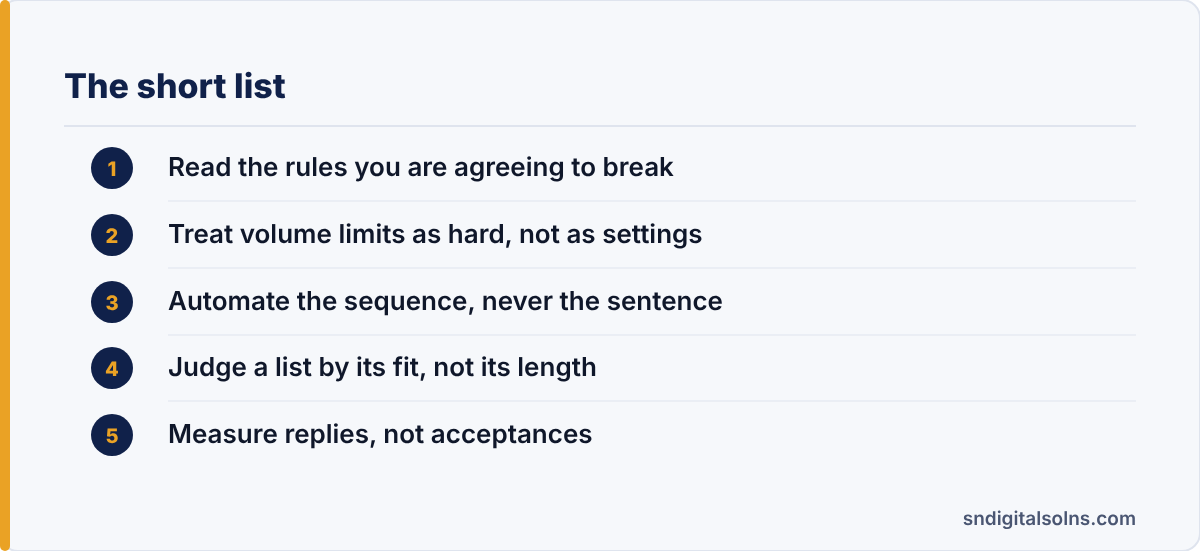
3. Automate the sequence, never the sentence
This is the rule that separates the accounts that work from the accounts that get reported. LinkedIn automation tools are good at remembering to follow up on day four and day eleven. They are bad at writing anything a stranger wants to read, and the spun first-line variables most vendors ship are worse than no personalisation at all.
In short, let the tool own the timing, the list and the record-keeping. Keep the words human. A fourteen-word message that proves you read the person’s last post outperforms anything a template generates, and it costs a minute.
4. Judge a list by its fit, not its length
Because LinkedIn automation tools make contacting two thousand people as easy as contacting fifty, the list quietly becomes the weak point. A search filtered only by job title and company size will be mostly wrong, and every wrong contact costs you reputation as well as a slot in the daily limit.
Instead, filter until the list is small enough that you could justify each name out loud. In our experience a hundred genuinely well-matched prospects beat two thousand plausible ones, and they keep the account healthy at the same time.
5. Measure replies, not acceptances
Nearly every dashboard shipped with LinkedIn automation tools leads with connection acceptance rate, since it is the number that looks best. However a connection is not a result. The figures worth tracking are positive reply rate, meetings booked, and how many of those meetings came from accounts you would have reached anyway.
Finally, track account health as a metric in its own right: warnings received, acceptance trend over time, and how many profiles you have had to rest. Teams that watch only the top of the funnel find out about the damage when an account is already restricted.
When LinkedIn automation tools are the wrong answer
If your offer is unclear, automation makes the lack of clarity more visible to more people. If your total addressable market is a few hundred companies, the time saved is not worth the risk to your profile. And if the people sending the messages are not the people who would take the call, the first reply will expose it.
Otherwise, used narrowly, they are a sensible way to stop good follow-up from being forgotten. If you want the sequencing designed around a real pipeline rather than a tool, our B2B lead generation service covers it, and our note on telling a real lead generation company from a reseller is worth reading first.